
Stauffers Plus FAQs
With our new Stauffers Plus program, we are making it easier for you to sign up once and be done. By becoming a Stauffers Plus Member, it will allow you to receive all program benefits, including our weekly e-mails.
There are multiple ways to sign up. You can sign up now on our website, on our online shopping page, through our Stauffers Fresh Foods App or stop in our Fresh Foods stores to have a Team Member assist you.
What happens when you are a Stauffers Plus Member?
- Enter phone number during checkout
- You will start earning and redeeming points
- Get additional savings
- Clip digital coupons
- Shop from our ad
Need to confirm you’re a Stauffers Plus Member or need to update your information? CLICK HERE
Sign Up FAQs
- Why is your rewards program changing?
- Following the merger of our partner companies, we adopted their new model to support a more cohesive and integrated program.
- Don’t have a text enabled cell phone?
- No problem… you can easily sign up at home with a landline or non texting cell phone. Simply click here, enter your phone number and choose “Call Me”. You will receive an automated call with a 4 digit verification code (could take up to 10 minutes to receive the call). Enter it on screen to be taken to the Personal Information Page. There you will enter your info, click save and relax until the program starts on 10/15.
- Don’t have a computer at home?
- No problem… stop in at customer service and a team member will be able to assist you.
- Don’t have email address?
- Ask your Friend/Family for help setting up or head to a local resource like a library
- Don’t want to sign up?
- No problem… you will continue to receive all sale pricing. To receive additional savings, you will need to sign up for our Stauffers Plus program
- Not sure if you signed up?
- You can always log into your account here to verify your information or stop in at customer service to have them look your account up.
- Looking for our Stauffers Fresh Foods App?
- If you have our business cards, simply scan the QR to download or click here to download.
Online Shopping FAQs
- For customers who miss Rosie
- The change from Rosie to Instacart was a result of Rosie being purchased by Instacart and merging both into a new online shopping experience.
- For those who are having trouble finding items on the new shopping site
- We are continuing to update products and product names to improve our customer experience. Upcoming customer enhancements will include our flyer and a shopping page to allow you to shop those products. Just like with Rosie, as you continue to shop with us, your order history will improve your shopping recommendations.
- For those who do not have a text enabled phone and want to place an online order (delivery or pick up)
- Unfortunately at this time, online ordering is currently not available.
- What are the fees for shopping online?
- Curbside: $3.99 Convenience Fee for orders under $35
- How do I create a shopping list?
- The shopping list is on the online shopping website.
- In the app, you can just add items to your cart and it acts as a list.
Delivery FAQs
- Who is delivering my order?
- To increase our delivery availability and allow customers to get orders when they need them, Stauffers is now partnered with Instacart for delivery orders. (Curbside is still Stauffers Team Members).
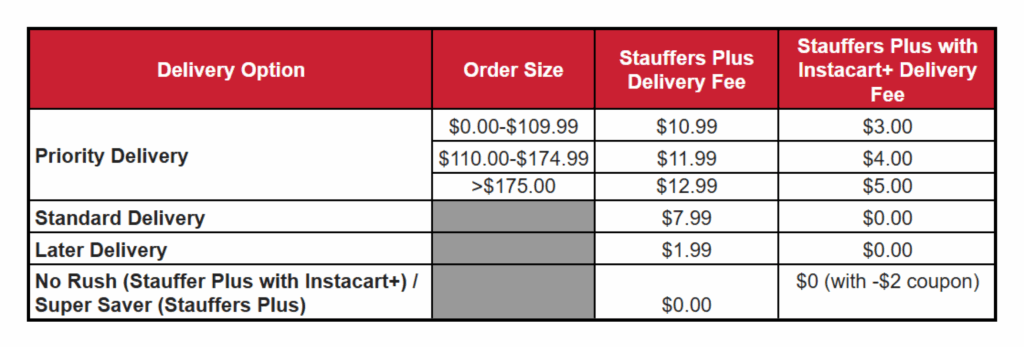
- What are the delivery charges?
- Based on your order amount, fees may vary
- Delivery – See chart below
- How to set delivery preferences?
- When checking out, click on your address to open the delivery details screen. This will allow you to choose “Leave at the door” or “Meet at the door” and also add any additional instructions for your driver.
- How can I provide feedback for my delivery driver?
- To rate your order in-app, follow the prompts in the rating pop-up after your order is complete. You can also select the order under Account > Orders and tap Rate.
- To rate your order on the website—
- Go to Your orders.
- Click Rate & Tip on the order and follow the prompts.
- Do I need to leave a delivery tip?
- Tips are optional but a great way to show your shoppers appreciation and recognition for their excellent service. 100% of your tip goes directly to the shopper(s) shopping and delivering your order.
- Instacart suggests a default tip based on several factors, such as order attributes and your tip history. We suggest a default tip during bad weather.
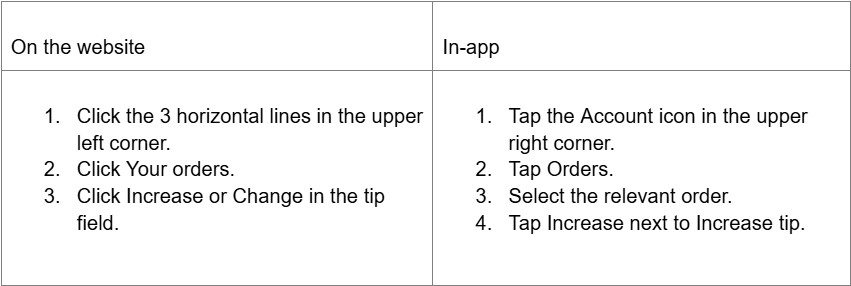
- You can modify the tip while placing an order or after delivery. However, you can’t modify the tip while the order is in progress. You can increase your tip up to 14 days after delivery or reduce your tip up to 2 hours after delivery.
- Tips are optional but a great way to show your shoppers appreciation and recognition for their excellent service. 100% of your tip goes directly to the shopper(s) shopping and delivering your order.
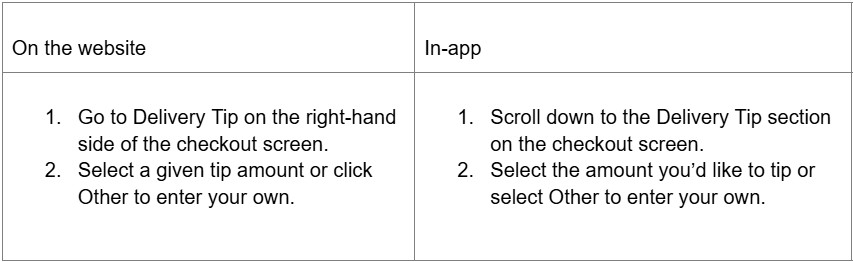
- To add a tip during checkout:
- To add or modify a tip after delivery: